How to make a mind map: a step-by-step guide with examples
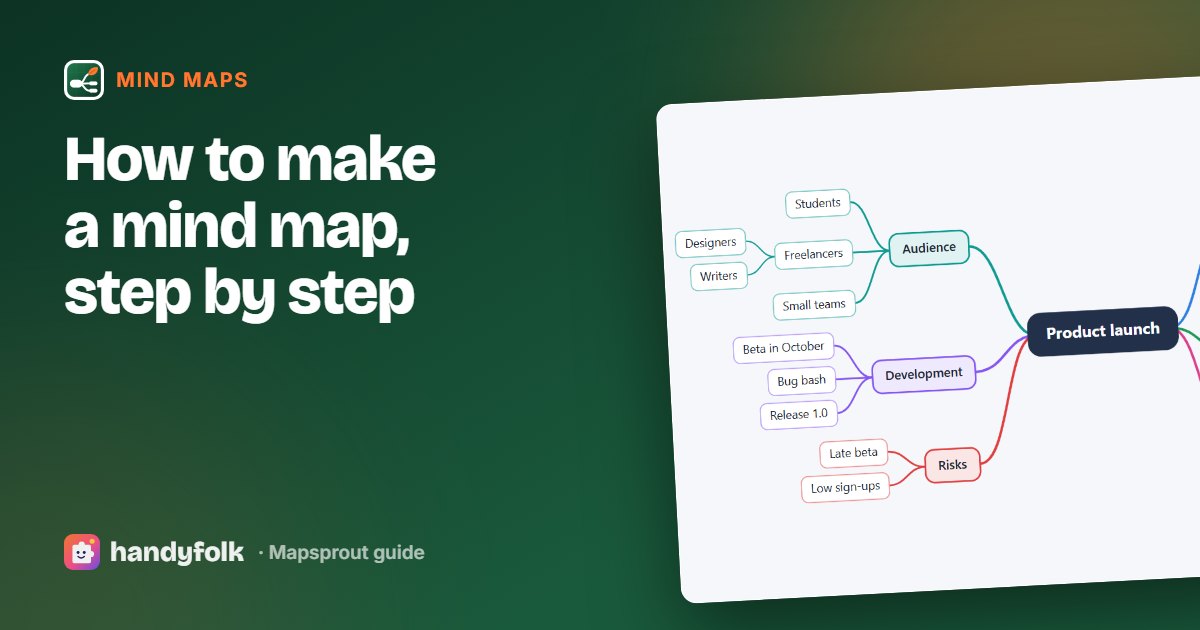
A page of notes is a list. It reads top to bottom, and every line looks as important as the next. A mind map shows the same ideas as a tree: one topic in the middle, the main ideas around it, the details branching off them. You see the whole subject at once, and you see how the parts connect. That is why mind maps work so well for studying, planning and getting a messy head in order.
This guide explains how to make a mind map step by step. It works the same on paper and on screen. You will find four worked examples (book notes, a study topic, a brainstorm and a project plan), the mistakes that make a map useless, a fair comparison of paper and apps, and mind map templates you can copy and use right away.
What is a mind map?
A mind map is a diagram with one central idea and branches that radiate out from it. Each branch is a main theme. Each theme splits into smaller branches with details, examples or tasks. The result looks a bit like a tree seen from above, or a city map with the center in the middle.
The idea is old, but the name and the modern form come from the British author Tony Buzan, who made mind mapping popular in the 1970s. His version used colors, pictures and curved branches, all drawn by hand. Today most people draw them in an app, but the rules are the same.
Three things make a mind map different from ordinary notes:
- One center. Everything on the map belongs to a single topic. If an idea does not connect to the center, it belongs on another map.
- A hierarchy. Big ideas sit close to the center, details sit further out. You can tell what matters most from where it is placed.
- Short labels. Each topic is a keyword or a short phrase, not a sentence. The structure carries the meaning.
Mind map or concept map?
The two are often confused. A concept map can have several main ideas and links between any of them, and the links carry labels such as “causes” or “is part of”. A mind map has one center and a clean tree of branches. Concept maps are better for showing how a complex system works. Mind maps are faster to make and easier to read, which is why they are the usual choice for notes, plans and brainstorming.
What a mind map is good for
- Summarizing a book, a course or a meeting. You keep the structure and drop the filler.
- Studying for an exam. Building the map is itself a good way to learn, because you have to decide what belongs where.
- Brainstorming. A new idea can go anywhere on the map without breaking the flow of a list.
- Planning a project, an event or a trip. Each branch becomes a work area, each small branch a task.
- Writing. Map an article or an essay first, then turn the branches into sections.
- Making a decision. Put the decision in the middle and give each option its own branch with pros and cons.
How to make a mind map in 7 steps
These steps work for any subject and any tool. On paper, use a large sheet turned sideways (landscape). In an app, open a new, empty map.
- Write the central topic in the middle. Keep it short and specific: “Photosynthesis”, “Product launch”, “Trip to Lisbon”. A vague center such as “Ideas” gives you a vague map.
- Add the main branches. These are the big themes of the subject, usually three to seven. For a book, they might be its main ideas; for a project, its work areas; for a study topic, the questions an exam could ask. Do not worry about the order yet.
- Use keywords, not sentences. “Inputs” is better than “What the plant needs to make food”. One or a few words per topic keeps the map readable at a glance. You can still add a longer note where you really need one.
- Branch out into details. Add subtopics under each main branch: facts, examples, steps, questions. Go one level deeper where it helps, but stop at three or four levels. Beyond that, a branch usually deserves its own map.
- Connect and group. Move topics until each sits under the branch it really belongs to. If two branches overlap, merge them. If one branch has grown huge, split it.
- Add color and emphasis. Give each main branch its own color, so you can follow it by eye. Make the few topics that really matter bold. On paper, small drawings and symbols help memory a lot.
- Review and tidy up. Read the map from the center outward. Can you explain the topic from it? Fold away or remove what does not add anything, and fill in gaps you notice. A map is a living document; it is fine to come back and change it.
That is the whole method. The rest of this guide shows it in action and covers what tends to go wrong.
Mind map examples
The four mind map examples below were made with Mapsprout, our free browser extension, but you could draw each of them on paper the same way.
1. Book notes
When you finish a nonfiction book, a mind map is a quick way to keep what you learned. Put the title in the center. The main branches are the big ideas of the book, plus one branch that is about you: what you will actually try. Under each idea, write two or three keywords that remind you of the argument.
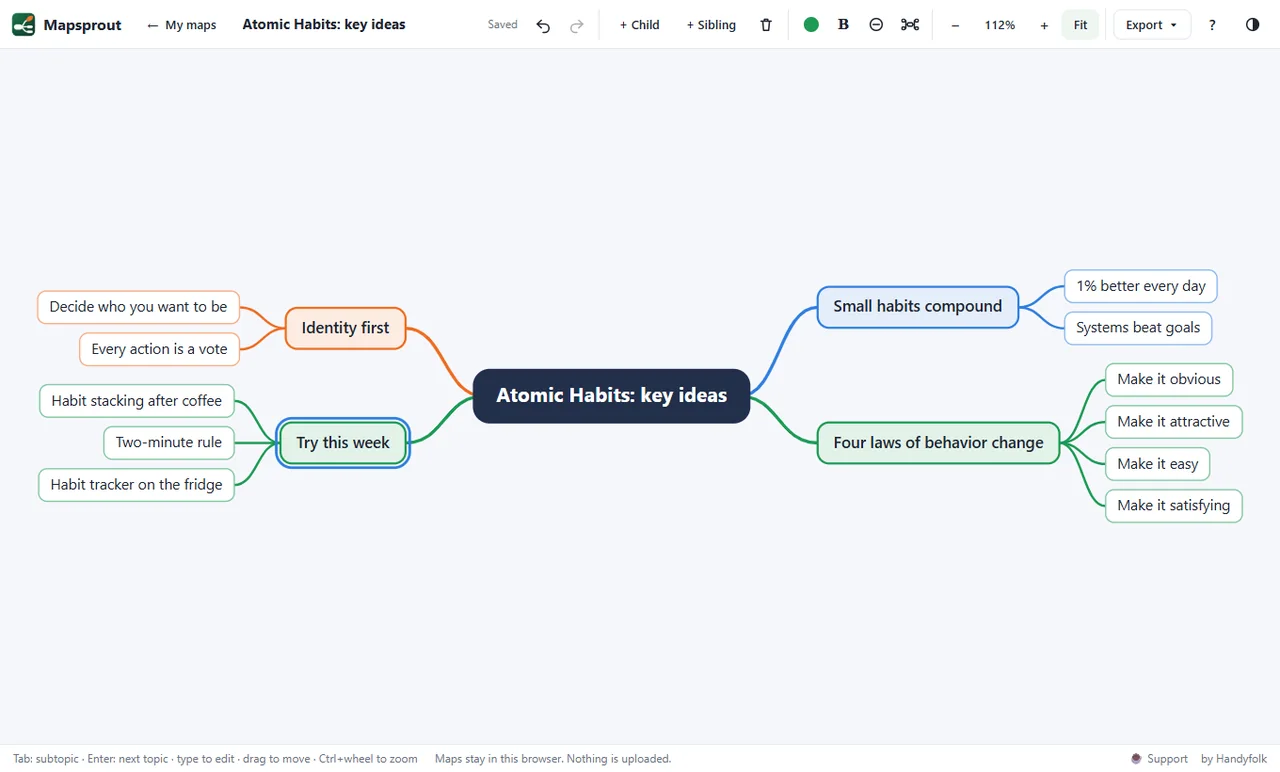
The “Try this week” branch is the most useful one. Without it, book notes tend to be a summary you never open again.
2. A study topic
For studying, build the map from the questions an exam is likely to ask: where, what goes in, what comes out, which stages. Then add a branch for the traps, the details that students often get wrong. Color it red and make it bold so it stands out when you review.
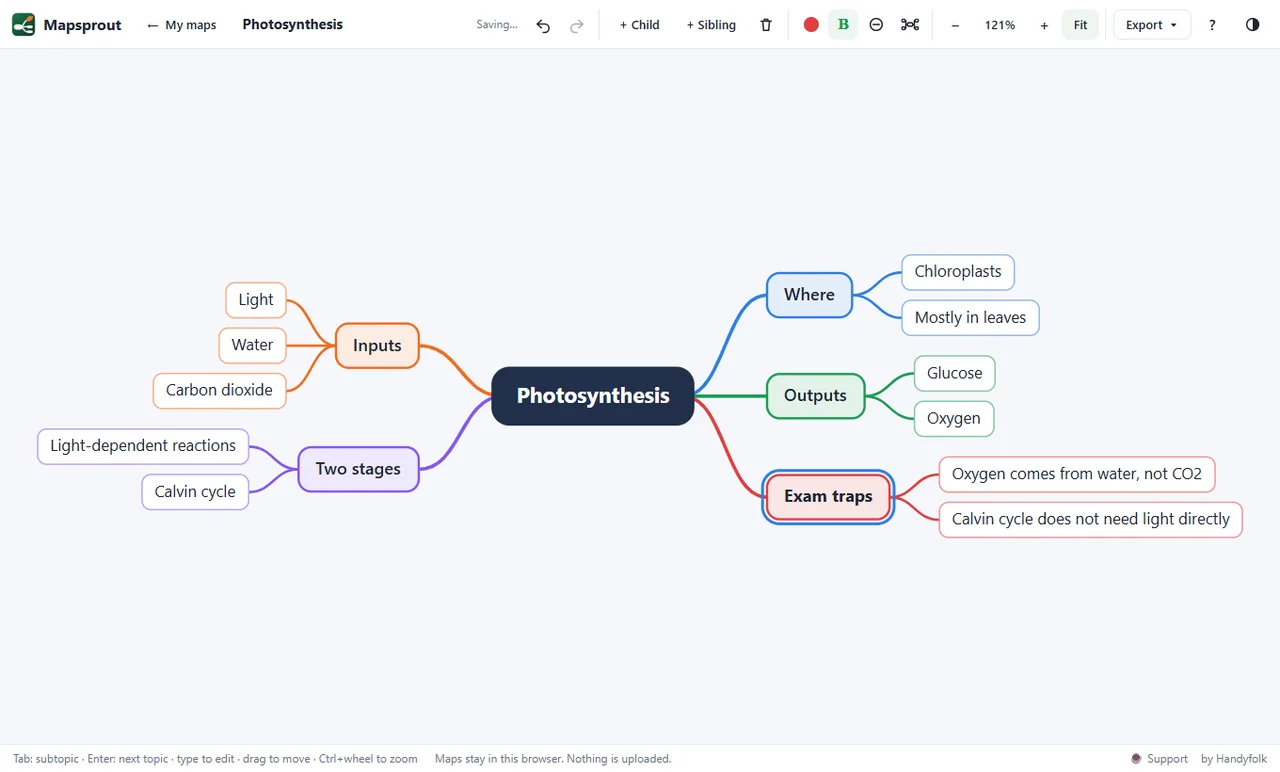
A good way to revise: cover the outer branches and try to say them from the main branches alone. In an app, fold a branch (collapse it) and see whether you can remember what is inside before you open it again.
3. A brainstorm
In a brainstorm, speed matters more than order. Put the question in the center and add ideas as fast as they come. Create a new main branch whenever an idea does not fit an existing one; that is how the categories appear by themselves. Sort and prune later.
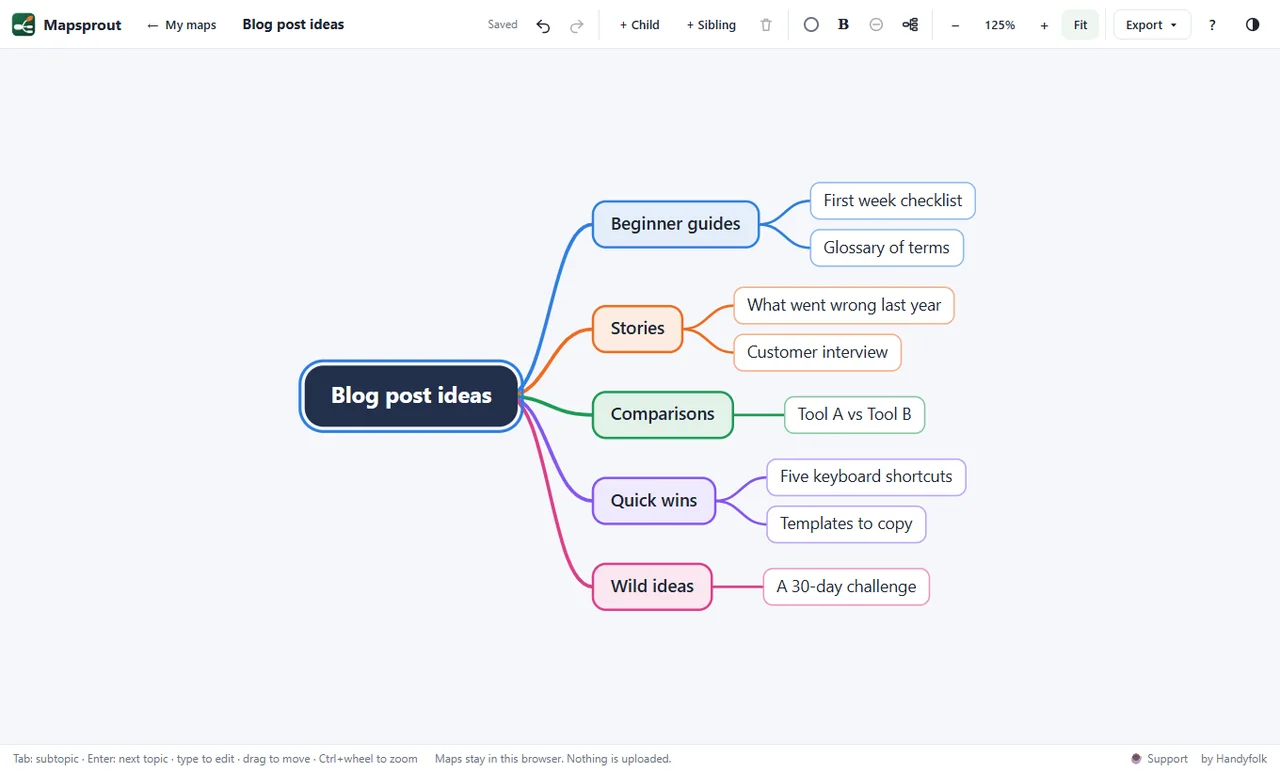
Keep a branch for wild ideas. It gives you permission to write down the odd thought without arguing with yourself, and sometimes the odd thought is the good one.
4. A project plan
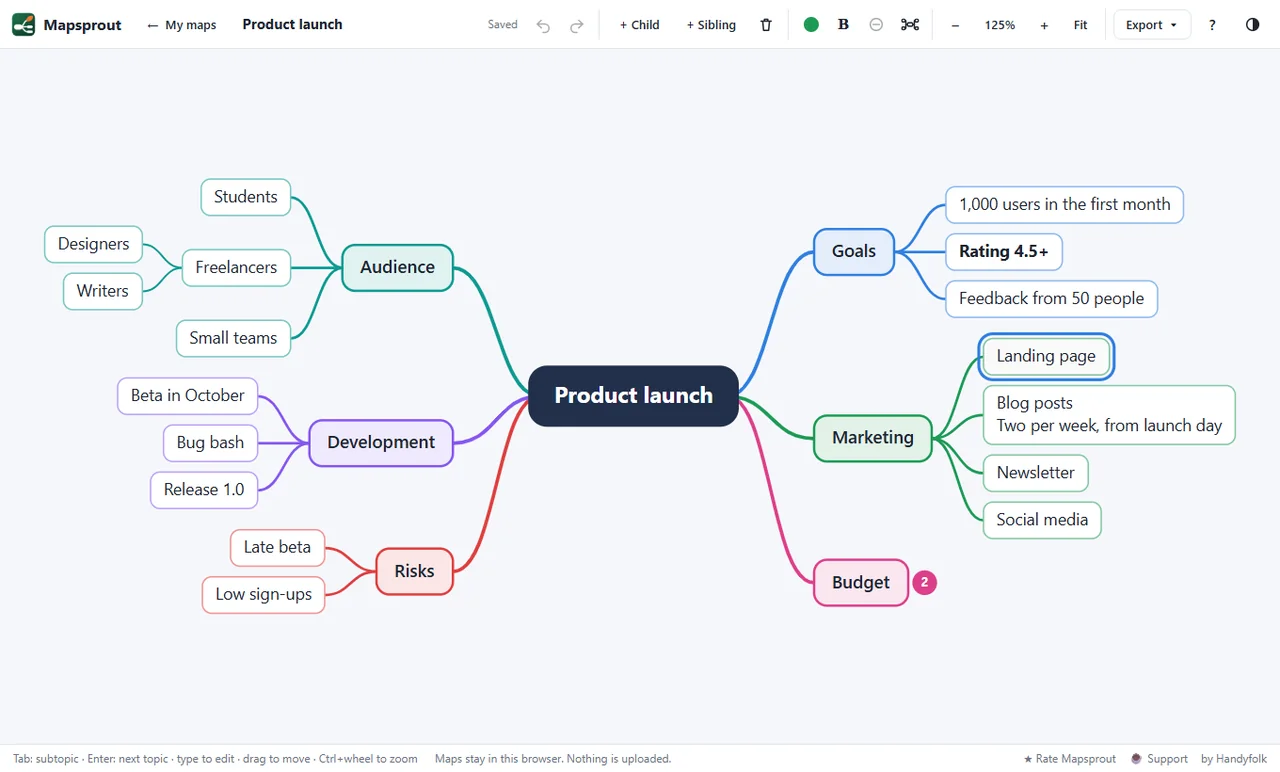
For a project, the main branches are the areas of work (goals, marketing, development, budget, risks), and the small branches are tasks or open questions. The map shows the whole plan on one screen, which a long task list never does. When the plan is clear, export it as an outline and turn it into a checklist in the tool your team already uses.
Common mistakes
Writing sentences
The most common mistake. Long sentences make topics wide, the map sprawls, and you cannot see the structure anymore. Cut each topic down to its keyword.
Too many main branches
Twelve branches around the center is not a map, it is a list in a circle. If you have more than seven or so, look for a theme that groups several of them.
Going too deep
Five or six levels of detail on one branch usually means that branch is its own subject. Start a separate map for it.
Mixing levels
“Marketing” and “send the newsletter on Monday” are not the same kind of thing, so they should not sit side by side. Keep big themes near the center and concrete details further out.
Making it pretty before it is right
Colors and drawings help, but only once the structure works. Get the branches right first, then decorate.
Making it once and never again
A mind map is cheap to change. When you learn something new, add it. When a branch turns out to be wrong, move it. The map should follow your thinking, not freeze it.
Paper or app?
Both work, and they are good at different things.
| Paper | Mind map app or extension | |
|---|---|---|
| Getting started | Instant, any pen | Instant once installed |
| Changing the structure | Hard: you redraw | Easy: drag a branch elsewhere |
| Running out of space | Happens often | Never |
| Drawings and doodles | As many as you like | Usually limited |
| Memory effect | Strong, drawing by hand helps | Good, a little weaker |
| Sharing and printing | Photo or scan | Image, PDF or outline |
| Turning it into a document | Retype everything | Export as an outline |
A good rule: use paper when the act of drawing is the point, for example to learn something by heart. Use an app when the map will change, grow or be shared, which is most of the time.
Choosing a mind map maker
If you look for a mind map online, you will find many tools, from MindMeister and Coggle to whiteboards such as Miro and desktop programs such as XMind. Before you pick one, check four things:
- Do you need an account? Most online tools want you to sign up before your first map.
- Is the free plan really free? Many free plans limit the number of maps, or put export behind a paywall.
- Where are your maps stored? With an online service, your notes live on its servers. That matters for work plans and personal notes.
- Can you get your maps out? An image is nice, but an outline or a file you can open again is what keeps you from being locked in.
If several people need to edit the same map at the same time, a mind map online service is the right choice. If you mostly map on your own, a tool that keeps everything on your computer is simpler and more private.
How to make a mind map in your browser with Mapsprout
Mapsprout is our free mind map maker. It is a browser extension that opens as a full tab: no account, no limit on the number of maps, and nothing is uploaded. Your maps are saved in your browser as you type, and it works offline. It is in Microsoft Edge Add-ons, and for Chrome it is a direct download from our site; the Firefox version is on the way.
- Install Mapsprout and click its icon. Your maps open in a tab. Click New map.
- Type the central topic. A new map starts with the central topic ready to edit, so just type.
- Add main branches with the keyboard. Press
Tabto add the first branch and type its name. PressEnterto add the next branch at the same level, type again, and so on. PressEscwhen you are done typing. - Branch out. Select a branch (click it or use the arrow keys) and press
Tabto add a subtopic under it.Shift+Tabmoves the selected topic one level up. To change a topic, pressF2or simply start typing. - Reorganize. Drag a topic onto another topic to move the whole branch there, or drop it on the top or bottom edge of a topic to place it before or after.
Alt+↑andAlt+↓change the order with the keyboard. - Add color and emphasis. Pick one of eight branch colors from the toolbar, make key topics bold with
Ctrl+B, and fold a branch withSpace. If the map gets wide, switch the layout from both sides to the right side only. - Save, export or print. There is no Save button; the map is saved as you type. Use Export to download it as an image or an outline.
Made a mistake? Ctrl+Z undoes it, and Ctrl+Y brings it back. The ? button in the toolbar shows the full list of keyboard shortcuts.
Start from an outline instead
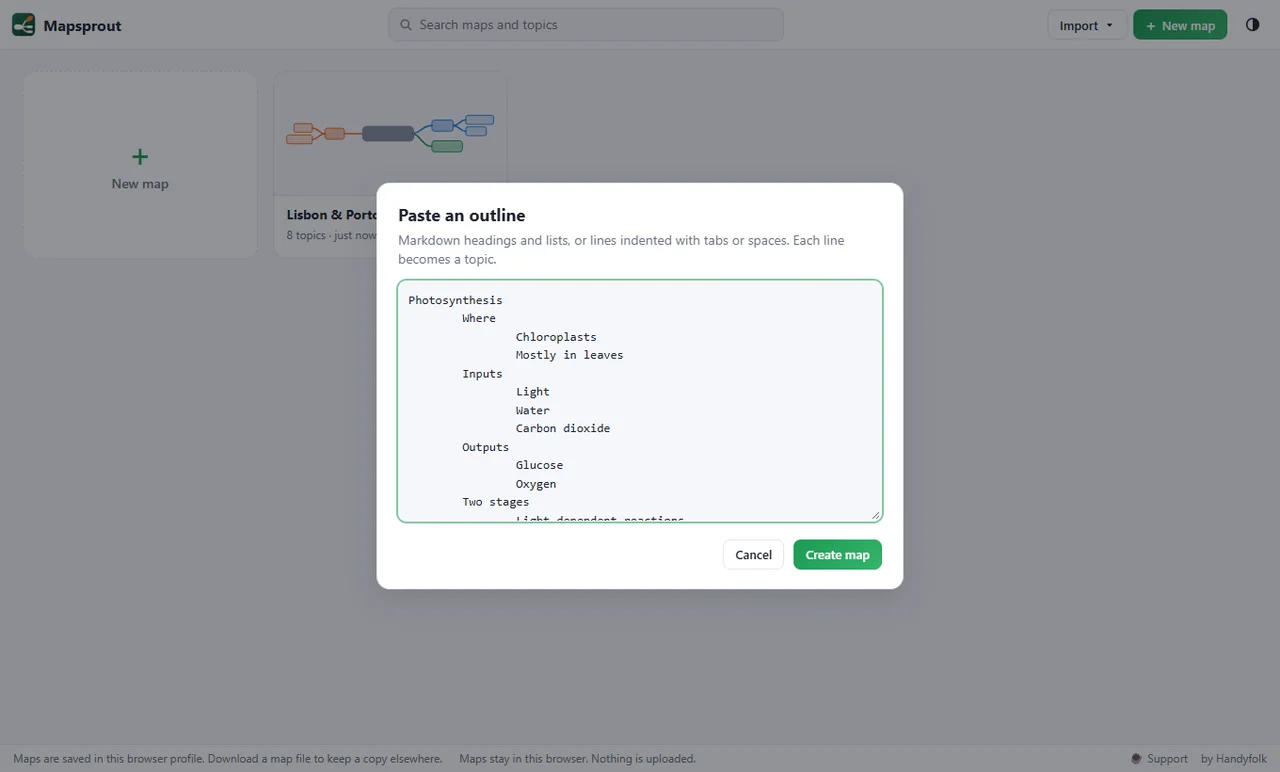
Maybe you already have the ideas as a list in your notes app or in a document. You do not have to retype them. Click Import, then Paste an outline…, and paste the text. Markdown headings, bullet lists, numbered lists and lines indented with tabs or spaces all work: each line becomes a topic, and the indentation decides where it goes. You can also open .md and .txt files, or drop them onto the window.
There is a shortcut for web pages too: select text on any page, right-click it and choose Make a mind map from the selection. Each line becomes a topic, and a single paragraph is split into sentences, ready for you to sort into branches.
Export, print and keep your maps safe
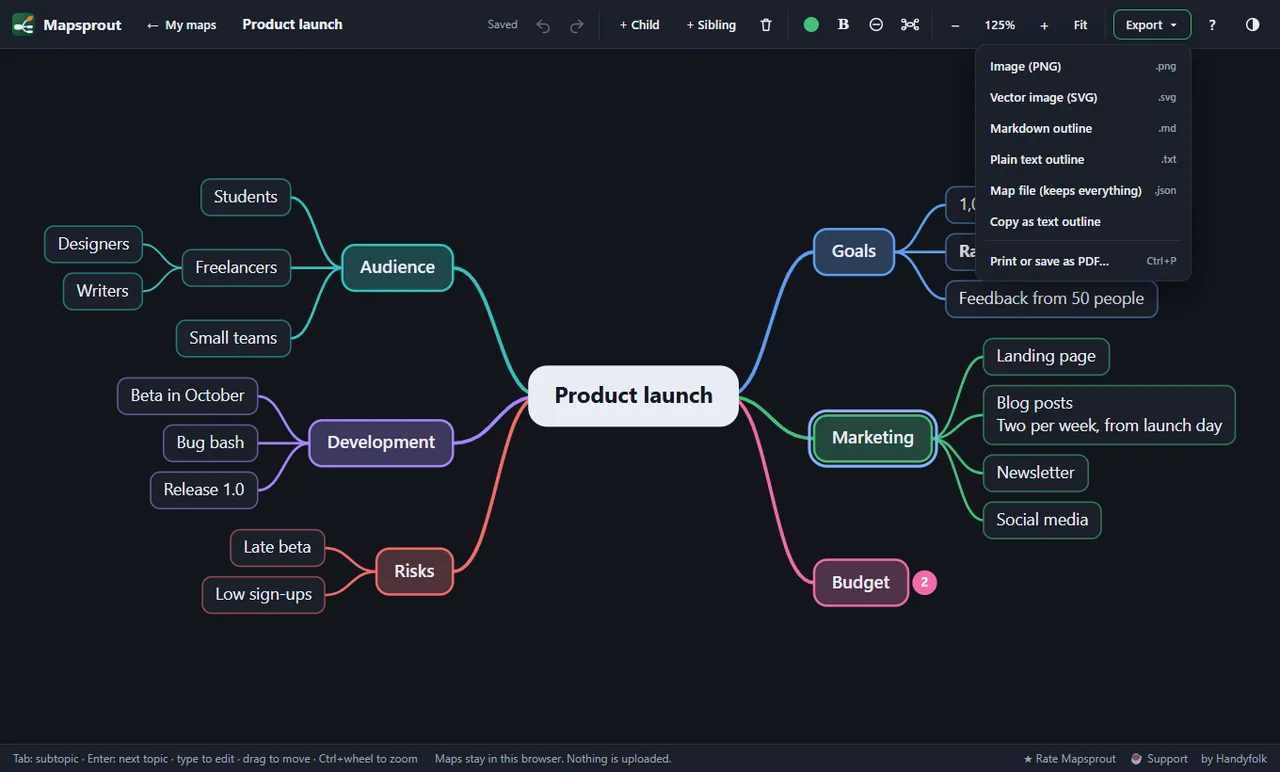
The Export menu saves the map as a PNG image or an SVG vector image (sharp at any size, good for slides and documents), as a Markdown or plain text outline, or as a map file (.json) that keeps everything and opens again in Mapsprout. Copy as text outline puts the outline on your clipboard, ready to paste into a document or a task list. To get a PDF, choose Print or save as PDF… and pick “Save as PDF” in your browser’s print dialog.
All your maps are listed on one page with a preview, and you can search them by title or by any word inside them. Since the maps live in your browser, keep a copy of the ones that matter: download a map file, or back up all your maps in one file, which you can restore later in this browser or another one.
Mind map templates to copy
A mind map template saves you from the blank page. Copy one of these outlines, replace the words in capitals with your own, and paste it into Mapsprout with Paste an outline… (or into any mind map maker that reads Markdown lists). On paper, use it as a checklist for your main branches.
Book or course notes
- BOOK TITLE: key ideas
  - The big idea in one sentence
  - Idea 1
    - Why it matters
    - Example
  - Idea 2
  - Idea 3
  - Quotes worth keeping
  - What I will try
Study topic
- TOPIC
  - Definition
  - Key terms
  - How it works
    - Step 1
    - Step 2
  - Examples
  - Exam traps
  - Questions to ask the teacher
Project plan
- PROJECT NAME
  - Goal
    - What does done look like?
  - People
  - Tasks
    - This week
    - Later
  - Budget
  - Risks
  - Deadlines
Decision
- DECISION TO MAKE
  - Option A
    - Pros
    - Cons
  - Option B
    - Pros
    - Cons
  - What matters most to me
  - Deadline for deciding
Frequently asked questions
What are the basic steps to make a mind map?
Write the central topic in the middle, add three to seven main branches, branch out into details with keywords, group and reorder the branches, add color, then review and tidy up.
How many branches should a mind map have?
Three to seven main branches is a good range. With more than that, look for themes that group several branches together.
Is there a free mind map maker without sign-up?
Yes. Mapsprout is free, needs no account, has no limit on the number of maps and keeps them on your computer. Paper is free too, of course.
Can I make a mind map in Word or Google Docs?
You can, with shapes and lines (in Google Docs through Insert, then Drawing), but every change means moving boxes by hand. A dedicated mind map tool is much faster, and you can still paste the result into your document as an image.
Can I turn a mind map into a list or a document?
In most apps, yes. In Mapsprout, export the map as a Markdown or plain text outline, or use Copy as text outline and paste it wherever you need it.
Do mind maps really help you remember?
Many students find them helpful, mostly because building a map makes you sort the material and decide what matters. That active work is what helps memory, so make your own maps rather than only reading someone else’s.
Summary
To make a mind map, start with one clear topic in the center, add a handful of main branches, and branch out into details using short keywords. Group, color and review it, and keep changing it as your thinking moves on. Paper is great when drawing helps you learn; an app is better when the map will grow, change or be shared. If you want a free mind map maker that needs no account and keeps your maps on your computer, try Mapsprout.