How to manage multiple Etsy shops in one browser at the same time
You started with one shop for handmade earrings. Then came a second one for printable planners, because mixing silver hoops and PDF calendars confused buyers. Or you keep a personal account for buying supplies and gifts, apart from the shop. Or your sister asked you to answer her customers while she is on vacation. In every case you end up with more than one Etsy login, and the browser keeps only one of them signed in.
This guide covers what Etsy actually allows, why the browser fights you, how the usual workarounds compare, and how to keep two or more Etsy accounts signed in side by side in a single window. Setting it up takes a few minutes.
Who needs two Etsy logins open at once
- Sellers with two distinct businesses. A craft shop and a digital downloads shop, or a vintage shop and a shop for your own designs. Different audiences, different branding, one person checking orders in the morning.
- A shop plus a personal buyer account. Many sellers prefer to keep their own purchases, favorites and reviews away from the shop account. It also lets you look at your listings the way a shopper sees them, which is not quite what you see while signed in as the owner.
- Helping a partner, friend or family member. With Shared Access, the owner invites you as a team member and you sign in with your own Etsy account. Etsy allows one shop per account, draft shops included, so if you also run a shop of your own, the account you use to help has to be a separate one.
All three end in the same place: two Etsy accounts that you would like to see at the same time.
Why signing in to one shop signs you out of the other
Etsy remembers who you are with a sign-in cookie, a small token your browser keeps for etsy.com and sends back with every page it loads. The browser holds exactly one set of cookies for each site, and every tab and window of your browser profile reads from that same set.
So when you sign in to the planner shop, its cookie takes the place of the earring shop's. The earring shop tab still looks fine until it loads something new; after that it belongs to the planner shop too. That is more than an annoyance. It is how a seller ends up replying to a buyer from the wrong shop, or editing a listing in the wrong catalog, without noticing.
Etsy's help center acknowledges this directly: most browsers will not keep you signed in to several Etsy accounts at once, and Etsy suggests a different browser for each one. That works, and it is one of the options below. Every option does the same basic thing: it gives each account a separate set of cookies.
Options for running multiple Etsy shops on one computer
1. Sign out, sign in, repeat
No setup at all, and fine if you check the second shop once a week. With daily orders and messages in both shops it gets old fast, and two-factor authentication adds a code to every switch.
2. A different browser for each shop
This is what Etsy itself recommends: shop one in Edge, shop two in Firefox, for example. The logins never touch, and they survive a restart. The downside is living in two browsers with different bookmarks, passwords and habits, and Alt-Tabbing between them all day.
3. A second browser profile
Same idea inside one browser: a separate profile with its own cookies. It is tidier than a second browser, but you still get a second window that looks nearly identical to the first, plus a second set of extensions and saved passwords to maintain.
4. A private window
An InPrivate or incognito window has its own temporary cookies, so it can hold a second login for a quick look. Close it and the login is gone. Good for checking how a listing looks to a signed-out shopper, not for running a business.
5. Colored tab groups with their own logins
Our free extension SessionPath gives each account its own cookies inside a colored tab group. Both shops sit in the same window, one group per shop, and both stay signed in. This is the method used in the steps below.
| Method | Both signed in at once | Survives a restart | One window | Best for |
|---|---|---|---|---|
| Sign out and in | No | Yes | Yes | A shop you rarely check |
| Second browser | Yes | Yes | No | Etsy's own suggestion; two shops |
| Second browser profile | Yes | Yes | No | People who like separate windows |
| Private window | Yes, one extra | No | No | A quick look as a shopper |
| Tab groups (SessionPath) | Yes | Yes | Yes | Daily work in two or more shops |
Shared Access is missing from the table on purpose. It solves a different problem: it gives a helper their own way into one owner's shop, but it does not let one browser stay signed in to two accounts.
Step by step: two Etsy shops side by side
SessionPath is free and needs no sign-up. It is coming first to Microsoft Edge, with a Chrome version to follow.
- Install SessionPath and pin it to the toolbar: click the puzzle icon at the top right of the browser, then the pin next to SessionPath.
- Sign in to your first shop on etsy.com in an ordinary tab, as you always do. Open Shop Manager if you like. Your normal tabs keep working exactly as before.
- Click the SessionPath icon on that Etsy tab. Under This tab it says Your normal login, and below it is a button that names the site: Open etsy.com in a new account. Click it.
- Sign in to the second shop in the new tab. It opens inside a fresh colored tab group, signed out, on the same page you were on. If you use two-factor authentication, Etsy asks for the code as usual. The page may reload once after the first sign-in; that is normal.
- Name the group after the shop. In the SessionPath window, open the … menu next to the new account, choose Rename and type something like “Planner shop”. Pick a color there too. The name appears on the tab group, so you always see which shop a tab belongs to.
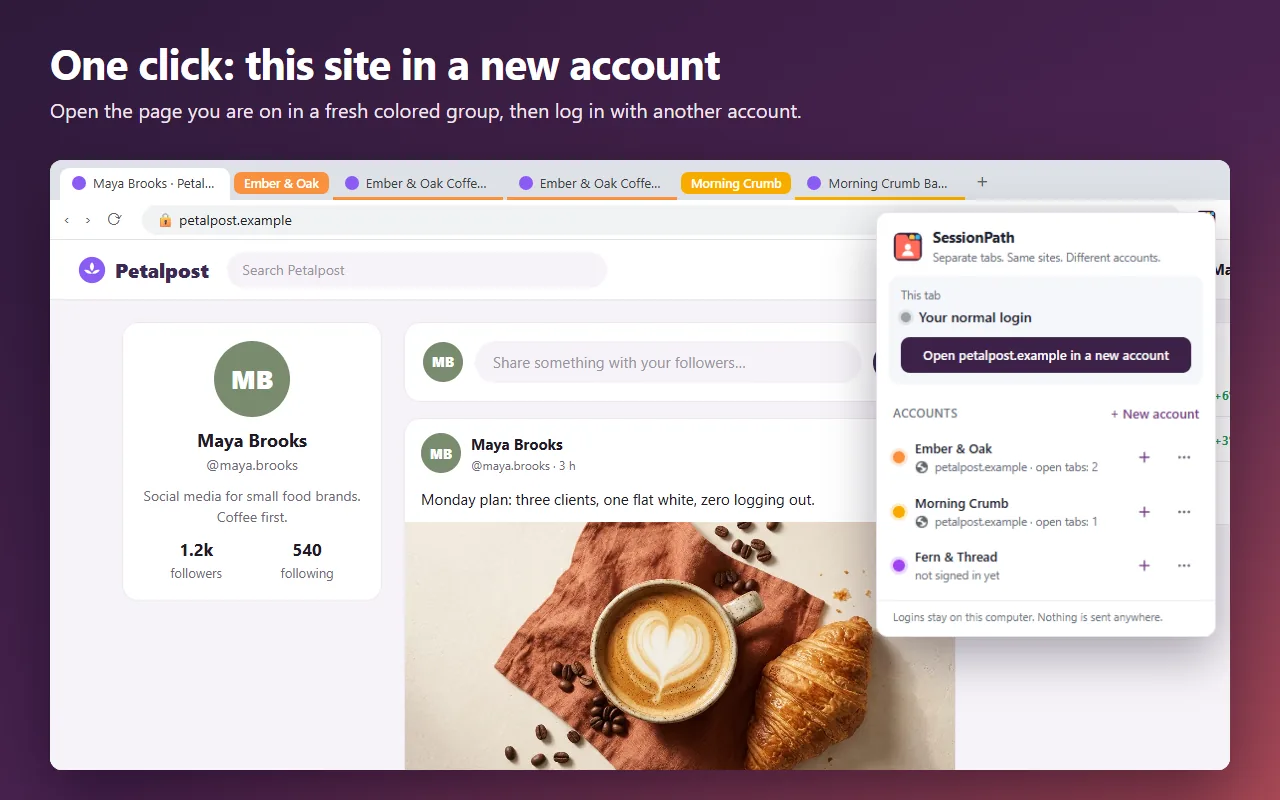
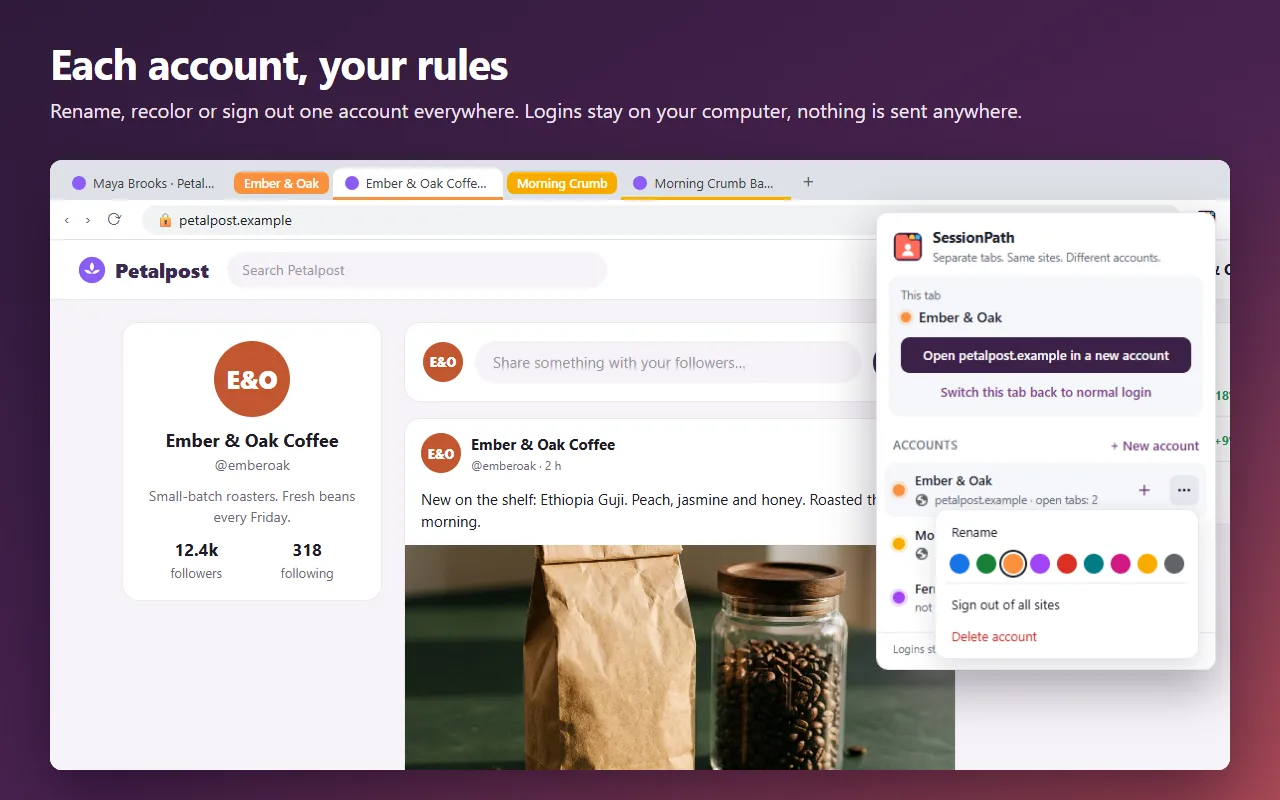
Running a third shop, or adding your buyer account? Click + New account in the SessionPath window, give it a name, then press the + next to it to open a new tab in that account and sign in there. There is no fixed limit on the number of accounts.
A normal working day with two shops
- Morning check. Messages and new orders in the first shop are in your normal tabs; the second shop's are in its colored group. You read both without signing anyone out.
- Links stay put. Open an order, a buyer's message or a listing from a tab in the “Planner shop” group and the new tab opens in that group, still signed in to the planner shop.
- Restarts are harmless. Close the browser at night and both shops are still signed in the next day.
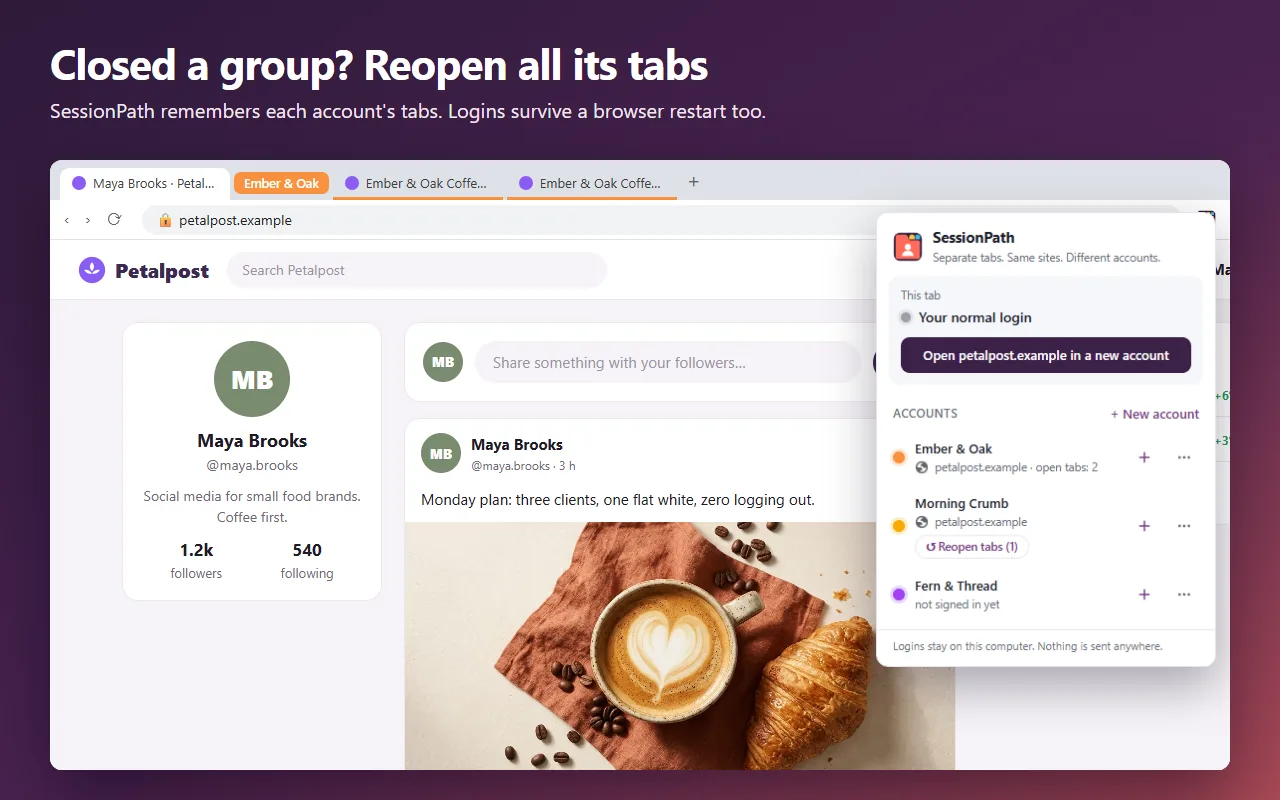
- Reopen what you closed. Closed the group to tidy up? Open SessionPath and press Reopen tabs under that account to get its tabs back.
- Fix a tab in the wrong place. If you opened the planner shop's listing in your normal tabs, open the account's … menu and choose Move this tab here. To take a tab out of an account, use Switch this tab back to normal login.
Troubleshooting
Etsy asks for a security code
If two-factor authentication is on, Etsy asks for a code when an account signs in from a fresh session. Enter it once; after that the login is remembered like any other.
No browser notifications for the second shop
Browser notifications and offline mode run in the background for the whole browser, not for a single tab, so they would always use your normal login. To keep accounts from mixing, SessionPath turns them off on sites you use inside its accounts. New messages show up as soon as you open or reload the tab.
I need to sign one shop out
Sign out on Etsy as usual, or open the account's … menu in SessionPath and choose Sign out of all sites. That clears the logins of that one account only; your normal tabs and other accounts stay signed in.
What SessionPath does not do
SessionPath keeps logins and site storage apart, nothing more. It does not change your IP address or disguise your browser, and it is not built to hide a link between shops. To Etsy, both shops are opened from the same ordinary computer, which matches what you have already disclosed by listing your shops in each Public Profile. Your logins stay in your browser on your computer; SessionPath has no servers, no analytics and no account to create.
Frequently asked questions
Can I run multiple Etsy shops from one account?
No. Etsy allows one shop per account, and each account needs its own email address. To open a second shop, you register a new account with a different email. Etsy also says it cannot merge shops or move shop information from one account to another.
Will Etsy mind that both shops are signed in on the same computer?
Etsy expects people with several shops to say so: you list every shop in the Public Profile of each account. What the Seller Policy forbids is duplicate shops used to shill, manipulate search or dodge its rules. Two honest, disclosed shops opened on the same computer are the situation Etsy describes in its own help article.
Can someone help with my shop without knowing my password?
Yes. With Shared Access you invite up to five team members from Shop Manager. Each of them signs in with a personal login, must turn on two-factor authentication, and cannot see your finances, refund orders or change settings. Etsy advises against sharing your password.
Does this work in the Etsy Seller app?
No. SessionPath is a browser extension for your computer. On the phone, use Etsy's own apps.
Summary
Etsy is fine with several shops as long as each has its own account, all of them are listed in every Public Profile, and none is a duplicate. The obstacle is your browser, which keeps one Etsy login at a time. Signing out works for a shop you rarely touch, a second browser is Etsy's own suggestion, and a private window is fine for a quick look. If you work in two shops every day and want them both in front of you, separate tab groups with their own logins keep everything in one window, clearly labeled.