How to open HEIC files on Windows and convert HEIC to JPG
Someone sends you photos from an iPhone, or you copy them from your own phone, and Windows greets you with an error or a blank icon instead of a picture. The files end in .heic, and the Photos app asks you to install something. This guide explains how to open HEIC files on Windows 10 and 11, what the format actually is, and the quickest ways to turn a photo into a plain JPG that works everywhere: in email, on websites and in old software.
There is no single best answer. If you get HEIC photos every week, it makes sense to fix Windows itself. If you just need one picture right now, a lighter tool is faster. We compare the options honestly below, including the free ones that come from Microsoft.
What is a HEIC file?
HEIC is Apple’s name for photos saved in the HEIF format (High Efficiency Image File Format). iPhones have used it as the default camera format since iOS 11, and many Android phones and cameras can save it too. Inside the file, the picture is compressed with HEVC, also known as H.265, the same technology used for 4K video.
The point is size. A HEIC photo is roughly half the size of a JPG of similar quality, so your phone stores twice as many pictures. HEIF can also hold more than one image in a file (bursts, some edits, depth data), and it supports 10-bit color, which JPG does not.
The catch is support. JPG has been readable by every device for thirty years. HEIC needs an HEVC decoder, and HEVC is covered by patents that carry license fees. That is the real reason Windows does not open these photos out of the box.
Why Windows can’t open HEIC by default
Windows 10 and 11 split HEIC support into two add-ons from the Microsoft Store:
- HEIF Image Extensions teaches Windows the HEIF container. It is free.
- HEVC Video Extensions provides the HEVC decoder that the picture inside the container needs. Microsoft charges a small fee for it in the Store, because of the HEVC licensing.
You need both. With only the free HEIF extension, most iPhone photos still will not show, because they are HEVC-compressed. Many laptops and PCs already have HEVC support preinstalled by the manufacturer, and on those the free HEIF extension is enough. If the Photos app offers you a Store link when you open a HEIC file, follow it and it will tell you what is missing.
Stop the problem at the source: the iPhone setting
If the photos come from your own iPhone, you can avoid HEIC entirely:
- Settings › Camera › Formats › Most Compatible makes the camera save new photos as JPG (and videos as H.264). The files take more space on the phone, but every computer opens them. Photos you already took stay HEIC.
- Settings › Photos › Transfer to Mac or PC › Automatic keeps HEIC on the phone but converts photos to JPG when you copy them to a computer over a cable.
Neither setting helps with photos someone else sent you, or with files already sitting on your drive. For those, read on.
Your options, compared
1. Windows Photos with the HEIF and HEVC extensions
This is the most complete fix for a Windows PC. Install both extensions from the Microsoft Store, and HEIC photos open in Photos like any other picture. File Explorer also starts showing thumbnails, and you can save a copy as JPG from the Photos editor. The trade-off is the small fee for HEVC on PCs that do not already have it, and a Microsoft account to buy it.
2. Free desktop apps: IrfanView and GIMP
IrfanView, a classic Windows image viewer (free for private use), opens HEIC with its free plugin pack, and its batch conversion can turn a whole folder into JPGs in one go. GIMP, the free and open source image editor, also opens HEIC files and exports them as JPG through File › Export As. Both are good choices if you already use them. Installing a full editor just to look at a vacation photo is more than most people need.
3. Online converters
Search for “HEIC to JPG” and you will find dozens of sites. You upload the file, the site converts it and you download the result. They work, and they are handy on a computer where you cannot install anything. Two things to keep in mind. First, the photo is sent to someone else’s server. Family pictures, scans of IDs and screenshots of documents are exactly the kind of thing people convert, so read the site’s privacy policy first. Second, phone photos usually carry metadata, often including the GPS location where the picture was taken, and it travels with the upload.
4. A browser extension that works offline
A HEIC viewer that runs inside your browser needs no install in Windows, no Store purchase and no upload. The decoder ships inside the extension and the photo is read from your disk. This is the approach we take with ViewDrop, our free extension, and the step-by-step part below uses it.
| Option | Cost | Uploads the photo | Thumbnails in Explorer | Save as JPG |
|---|---|---|---|---|
| Photos + HEIF/HEVC extensions | HEIF free, HEVC paid unless preinstalled | No | Yes | Yes |
| IrfanView with plugins | Free for private use | No | No | Yes, also in batches |
| GIMP | Free | No | No | Yes |
| Online converter | Usually free with limits | Yes | No | Yes |
| ViewDrop extension | Free | No | No | Yes, JPG or PNG |
Step by step: open a HEIC photo and save it as JPG with ViewDrop
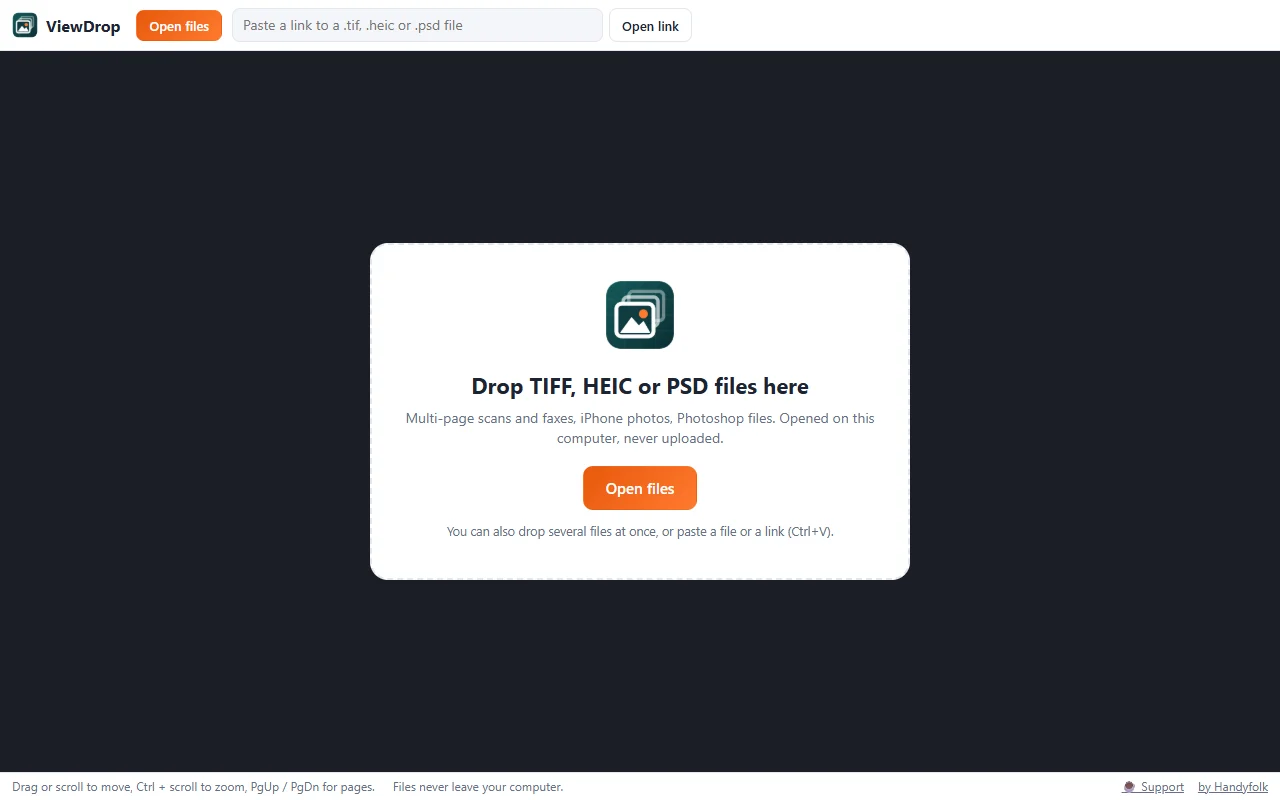
ViewDrop opens HEIC and HEIF photos, Photoshop files and multi-page TIFF scans in a browser tab. It needs no account, there are no servers of ours, and the file never leaves your computer. It is in Microsoft Edge Add-ons, and for Chrome you can install it from a small download on its page, in about a minute.
- Click the ViewDrop icon in the toolbar. The viewer opens in a new tab.
- Drop the HEIC file onto the page, or click Open files and pick it. You can drop several photos at once, and they line up in the Files list on the left. You can also copy a file in File Explorer and press
Ctrl+Vin the viewer. - Look at the photo. Use Fit or Width, the plus and minus buttons, or
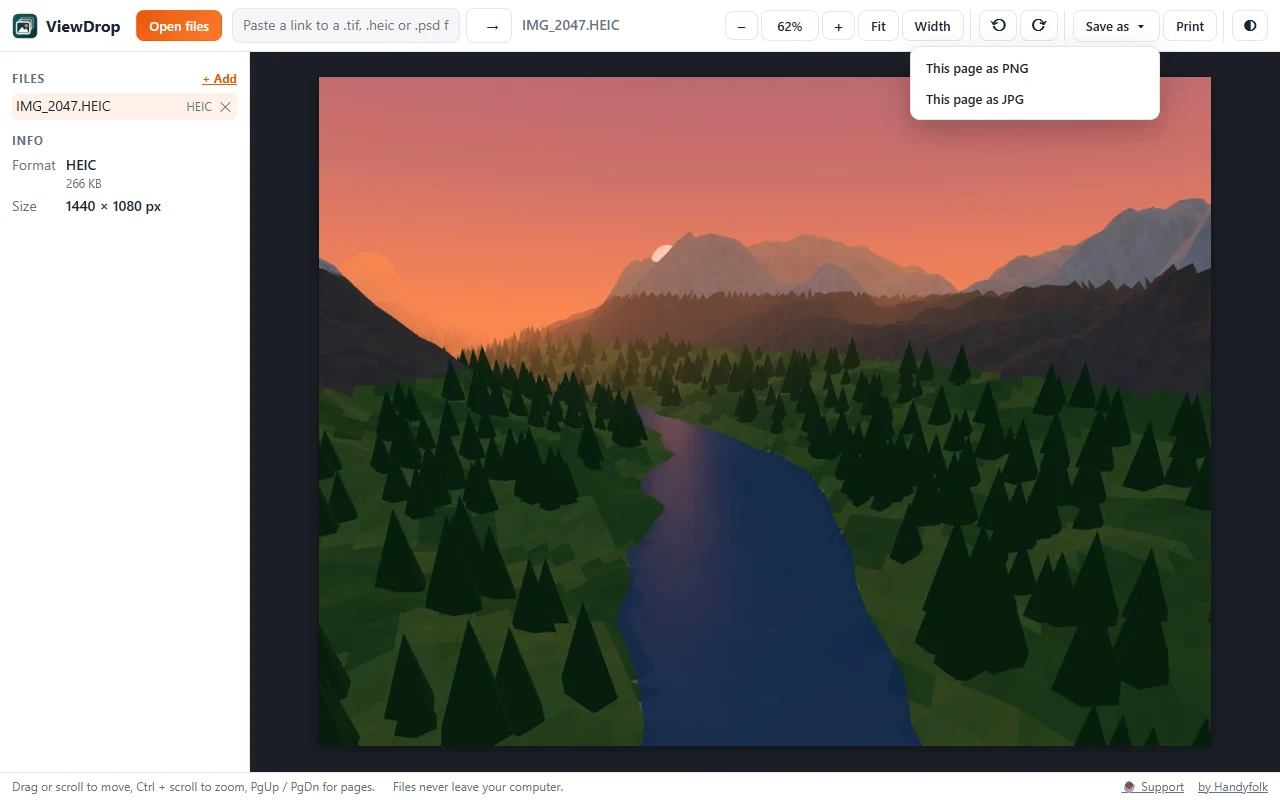
Ctrl+ scroll to zoom. The Info panel shows the format, the file size and the size in pixels. - Rotate if needed with the arrow buttons, or press
R(andShift+Rto turn the other way). - Click Save as › This page as JPG, or choose PNG if you need a lossless copy. The browser downloads it with the same name and the new extension.
Some HEIC files hold more than one picture. ViewDrop shows each one as a separate image in the side panel, so you can step through them and save the one you want.
If the photo is on a website or in web mail as a link, right-click the link and choose Open with ViewDrop. The first time, ViewDrop asks for access to that one site, so it can download the file. It never asks for access to all sites at once.
JPG or PNG: which one should you pick?
For photos, choose JPG. It is what every phone, website and email client expects, and the files stay small. PNG is lossless, so it keeps every pixel exactly, but a photo saved as PNG is often three to five times bigger than the same photo as JPG. PNG makes sense for screenshots, graphics with sharp edges and images you plan to edit again.
One thing to know: a HEIC photo can be 10-bit and in a wide color space. When you convert HEIC to JPG with any tool, you go down to standard 8-bit color. On normal photos you will not see a difference. On a sunset with smooth gradients you might, very slightly.
Tips and troubleshooting
Photos says “This file format isn’t supported” even after I installed the HEIF extension
You probably have the HEIF part but not the HEVC decoder. Open the Microsoft Store, search for HEVC Video Extensions and check whether it is installed. Restart Photos after installing.
The file ends in .heic but nothing can open it
Check the size. A file of a few kilobytes may be a placeholder from a cloud service that was never fully downloaded. In OneDrive or iCloud for Windows, right-click the file and choose to always keep it on this device, then try again.
My Live Photo turned into a still picture
A Live Photo is two files: a HEIC still and a short MOV video. Image viewers show only the still. The video part is a separate file next to it.
The JPG has lost the date and location
Many converters drop the photo’s metadata, and ViewDrop saves only the picture as well. That is good for privacy when you share a photo with strangers, but if you sort your library by date taken, use the Photos app or a desktop converter that copies metadata over.
I need to convert hundreds of photos
Do not do it one by one. Use the iPhone’s Automatic transfer setting for future copies, or the batch conversion in IrfanView for a folder you already have.
Frequently asked questions
Can Windows 11 open HEIC files without extra software?
Not on its own. Windows 11 needs the HEIF Image Extensions and, on most PCs, the HEVC Video Extensions from the Microsoft Store. Some computers come with HEVC already installed by the manufacturer.
How do I convert HEIC to JPG for free?
Open the photo in a free tool such as GIMP, IrfanView or the ViewDrop extension and save it as JPG. On an iPhone, the Most Compatible camera setting avoids HEIC for new photos altogether.
Is there a HEIC viewer that does not upload my photos?
Yes. Desktop apps and the Windows Photos app work offline, and ViewDrop decodes the photo inside your browser without sending it anywhere.
Is HEIC better quality than JPG?
At the same file size, yes. HEIC keeps more detail and supports 10-bit color. At the same quality, it is about half the size. Its only real weakness is compatibility.
Should I switch my iPhone to Most Compatible?
If you share a lot with Windows users or upload photos to older websites, it saves trouble. If phone storage is tight and most of your photos stay in Apple’s world, keep HEIC.
Summary
Windows cannot open HEIC photos out of the box because the format uses HEVC compression, which needs a licensed decoder. For a permanent fix, add the HEIF and HEVC extensions to the Photos app. For your own iPhone, switch the camera to Most Compatible or let the phone convert on transfer. For a quick look or a single conversion, a free HEIC viewer such as GIMP, IrfanView or ViewDrop does the job, and the offline tools keep your photos on your computer. That is how to open HEIC files on Windows without fuss: pick the fix that matches how often the problem comes up.