How to open PSD without Photoshop: free ways to view the file and its layers
A designer sends you a .psd file for approval, a template you bought online comes as a Photoshop file, or you find an old project folder full of them. You double-click, and Windows has no idea what to do. You do not need a Photoshop subscription just to look. This guide shows how to open PSD without Photoshop, see the layers inside, and save a normal PNG or JPG you can send to anyone.
We compare the free routes, from a web editor to the viewer already built into a Mac, and explain what each one shows well and what it gets wrong. The short version: almost any tool can show you the picture, but only some can show the layers correctly.
What is inside a PSD file
PSD (Photoshop Document) is Photoshop’s native format. Unlike a JPG, which is one flat picture, a PSD keeps the work in separate pieces:
- Layers: photos, shapes, text and painted areas stacked on top of each other, each with its own opacity and blend mode.
- Groups: folders of layers, often named like “Header” or “Logo variants”.
- Hidden layers: alternatives the designer switched off but kept in the file.
- Live effects: adjustment layers, layer styles such as drop shadows, masks and smart objects.
- A composite image: a ready-made flat copy of the whole picture, saved when the “Maximize compatibility” option is on.
PSB (Photoshop Big) is the same idea for very large documents. A PSD is limited to 30,000 pixels on each side and 2 GB; a PSB goes up to 300,000 pixels. Many tools that read PSD also read PSB, but not all.
That composite image matters more than people think. A simple viewer shows you only the composite. If the designer turned off “Maximize compatibility” to save space, there is no composite, and simple viewers show a blank or gray image even though the file is fine.
Free ways to open PSD without Photoshop
1. Photopea (in the browser)
Photopea is a free web-based editor that looks and works much like Photoshop. It opens PSD files with layers, groups, text, many layer styles and smart objects, and it can export to PNG, JPG and back to PSD. The free version shows ads. Photopea says files are processed in your browser rather than uploaded. If you need to actually edit a PSD, this is the closest free option.
2. GIMP
GIMP, the free and open source editor for Windows, Mac and Linux, imports PSD files with their layers and groups. Simple pixel layers come through well. Text layers usually arrive as pictures of text, and adjustment layers, layer effects and smart objects may be missing or simplified, so the result can look different from the original. Fine for pulling out a layer, less reliable for judging the final design.
3. Krita
Krita, a free painting program, also opens PSD files with layers. It is aimed at artists, so it handles painted artwork well. Like GIMP, it does not support every Photoshop feature.
4. Preview and Quick Look on a Mac
macOS opens PSD files out of the box. Select the file in Finder and press the space bar for Quick Look, or double-click to open it in Preview. You see the composite image and can export it as PNG or JPG with File › Export. There are no layers, and files saved without a composite may not show correctly.
5. Windows File Explorer
Windows does not show PSD thumbnails or previews on its own. Third-party thumbnail add-ons can fill that gap, but they also show only the composite, and you still need a program to open the file.
6. A viewer extension in your browser
If you mostly need to look, check the layers and save an image, a browser extension is the lightest option. Nothing to install in Windows, no account and no upload. ViewDrop, our free extension, does this, and the next section walks through it.
| Tool | Platform | Layers | File without composite | Edit and save PSD |
|---|---|---|---|---|
| Photopea | Any browser | Yes, most features | Yes | Yes |
| GIMP | Windows, Mac, Linux | Yes, some simplified | Yes | Export only |
| Krita | Windows, Mac, Linux | Yes, some simplified | Yes | Yes |
| Mac Preview / Quick Look | macOS | No | Not reliably | No |
| Windows Explorer | Windows | No | No | No |
| ViewDrop extension | Edge, Chrome | View, one at a time | Yes, built from the layers | No, saves PNG or JPG |
Step by step: view a PSD and its layers with ViewDrop
ViewDrop is a free PSD viewer that also opens HEIC photos and multi-page TIFF scans. It reads the file on your computer and never uploads it. It is in Microsoft Edge Add-ons, and for Chrome you can install it from a small download on its page.
- Click the ViewDrop icon in the toolbar to open the viewer tab.
- Drop the .psd or .psb file onto the page, or click Open files. Large files take a few seconds.
- Look at the full image. Zoom with the plus and minus buttons, Fit, Width or
Ctrl+ scroll, and drag to move around. - Check the Layers list on the left. It shows the layers from top to bottom like Photoshop, with groups indented, a small thumbnail for each layer, hidden layers crossed out and marked hidden, and the opacity when it is below 100%.
- Click a layer to see it alone on a transparent checkerboard. Click Show full image to go back.
- Save as › This page as PNG or JPG. If a single layer is on screen, that layer is saved, with its name added to the file name. Pick PNG to keep the transparency.
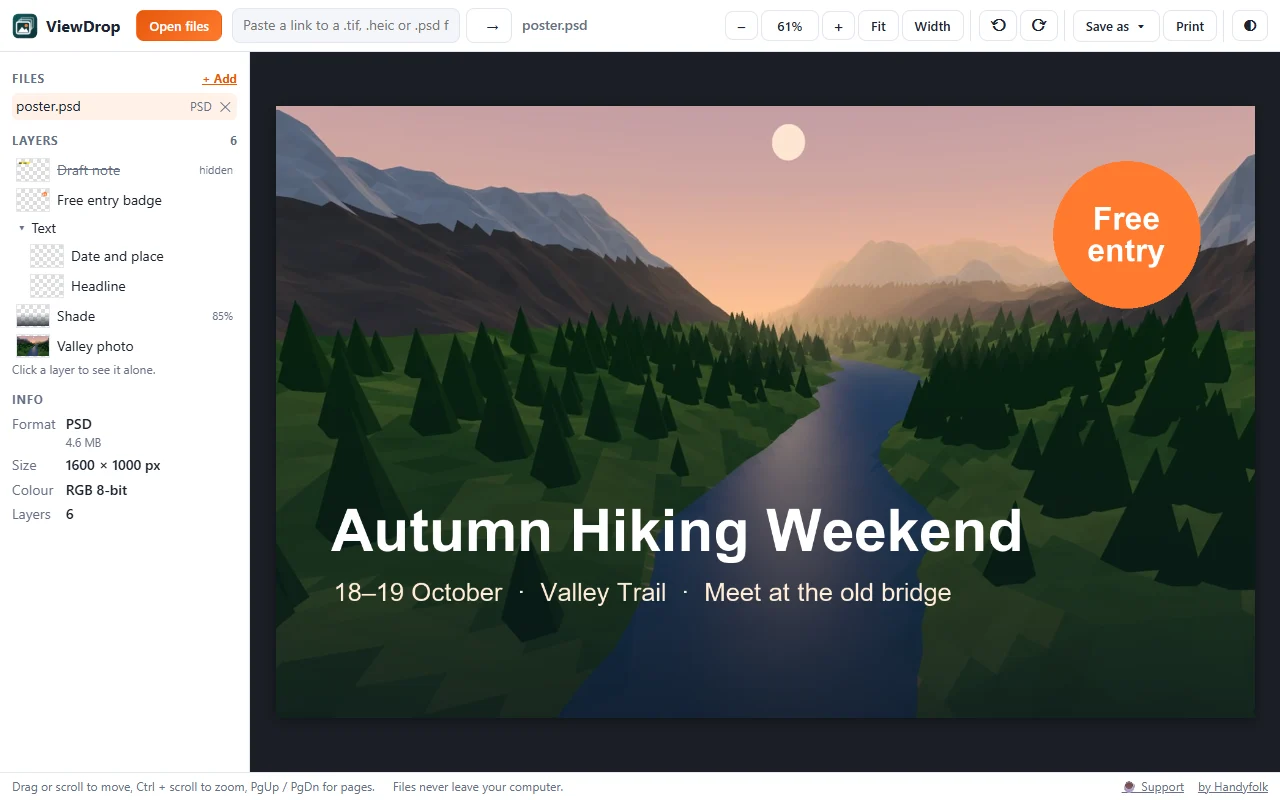
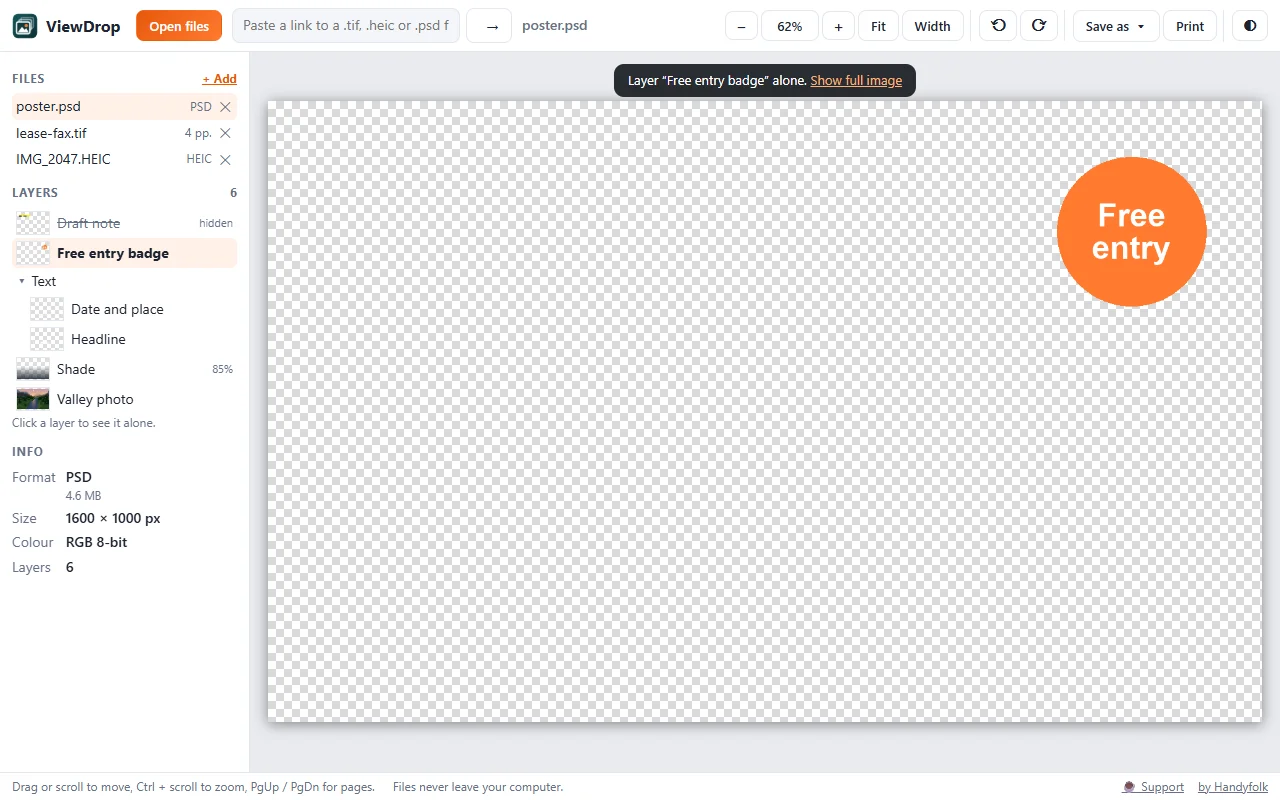
The Info panel tells you the format (PSD or PSB), the file size, the image size in pixels, the color mode and bit depth, and the number of layers. That is often all you need to answer “is this the print version or the web version?”
If the file has no saved composite, ViewDrop builds the full image from the layers itself and says so in the Info panel. Normal layers with opacity come out right. Special blend modes and effects are shown in a simplified way, and the panel warns you when that happens.
The light and dark background button in the top right switches the area around the image. A dark background helps with light artwork, a light one with dark artwork.
Tips and troubleshooting
The image is blank, gray or white
The file was probably saved without “Maximize compatibility”, so there is no composite. Use a tool that builds the picture from the layers: Photopea, GIMP, Krita or ViewDrop. If you are in contact with the designer, ask them to resave with that option turned on.
The text looks wrong or a font is replaced
Text layers depend on fonts installed on the designer’s computer. Editors that let you change the text need the same font, and without it they swap in another one. The composite image and the layer pixels show the text as the designer saw it, so judge the look from those.
Colors look duller than expected
The file may be in CMYK, a color mode meant for print. Screens show RGB, so CMYK files always look a bit different in any viewer. The Info panel shows the color mode.
The file is huge and the browser struggles
Very large documents, especially PSB files, can exceed what a browser tab can hold. ViewDrop opens images up to 150 megapixels. For bigger files, use a desktop editor.
I need to change something and send back a PSD
A viewer will not do that. Photopea and Krita can save PSD files. For complex files with smart objects and many effects, the designer’s own Photoshop is still the safe way to make edits.
Frequently asked questions
What is the easiest free PSD viewer for Windows?
For looking at the file, a browser-based option is easiest: Photopea if you also want to edit, or a viewer extension such as ViewDrop if you only want to view and save images. GIMP is the classic desktop choice.
Can I convert a PSD to JPG without Photoshop?
Yes. Open it in any of the tools above and export or save as JPG. Choose PNG instead if you need a transparent background.
Can I open a PSD file on a Mac without Photoshop?
Yes. Press the space bar in Finder for Quick Look, or open it in Preview. For layers, use Photopea, GIMP or Krita.
Can I extract one layer from a PSD?
Yes. In ViewDrop, click the layer and save it as PNG. In GIMP or Photopea, hide the other layers and export.
Is it safe to open PSD files from strangers?
A PSD is an image document, not a program. Still, only open files you expected, and prefer tools that keep files on your computer when the design is confidential.
Summary
You can open PSD without Photoshop in several free ways. Mac users already have Preview and Quick Look for a quick look at the full image. Photopea is the closest free thing to Photoshop if you must edit, and GIMP and Krita are solid desktop editors with some limits on Photoshop-only features. For a fast, private look at the layers and a clean PNG or JPG, a PSD viewer in your browser such as ViewDrop is the lightest way.