
Install TrimDrop in Chrome
TrimDrop is on its way to the Chrome Web Store. Until it gets there, you can install it from this file in about a minute. It is the same extension, free, with no account.
Install in 4 steps
- Unzip the file. On Windows, right-click it and choose “Extract All”. On a Mac, double-click it. Put the folder somewhere it can stay, for example in Documents. Chrome runs TrimDrop from this folder, so don’t delete it.
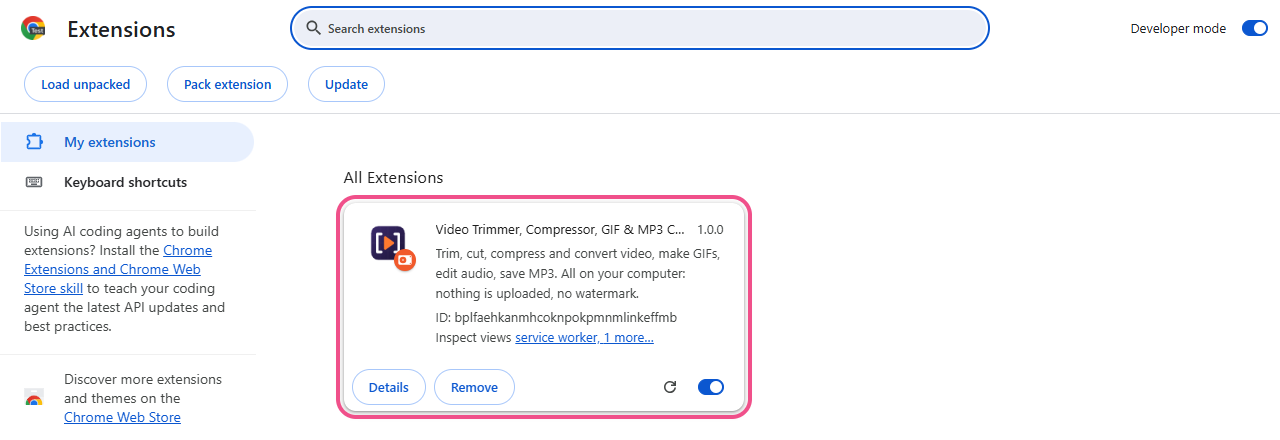
- Open the extensions page and turn on Developer mode. Paste this into the address bar and press Enter, then switch on “Developer mode” in the top right corner.
chrome://extensions

- Click “Load unpacked” and pick the folder you unzipped (the one that has
manifest.jsoninside).
- Done. Pin TrimDrop: click the puzzle icon in the Chrome toolbar and pin it. Click its icon any time to open the editor, then drop a video or audio file into it.
Using Microsoft Edge? You don’t need the zip: get TrimDrop from Microsoft Edge Add-ons, with automatic updates. The Firefox version is coming soon.
Questions
Why isn’t it in the Chrome Web Store yet?
The Chrome Web Store limits how many new extensions one developer can publish at a time. TrimDrop is in line. Until then this download is the way to get it.
Is it safe?
It is the same code we submit to the stores for review. TrimDrop has no servers, no accounts and no analytics, asks for no access to websites, and your files never leave your computer. See the privacy policy.
Will it update by itself?
No. Extensions installed this way don’t update automatically. Check this page now and then; when a new version is out, download it and replace the folder, then click the reload arrow on the TrimDrop card.
Chrome says Developer mode is on. Is that a problem?
No, that is a normal reminder. Keep Developer mode on: if you turn it off, Chrome switches off extensions installed from a folder, including TrimDrop.
What happens when TrimDrop reaches the Chrome Web Store?
Install it from the store and remove this copy. Want a note when it’s there? Email us and we’ll write back.
Stuck? Write to [email protected]